
Boosting My Developer Productivity with AI in 2025
Introduction
I don't usually share my GitHub contributions graph. If anything, it's evidence of an unhealthy obsession with software development rather than something to brag about. This time I'm making an exception because it tells a short, useful story.
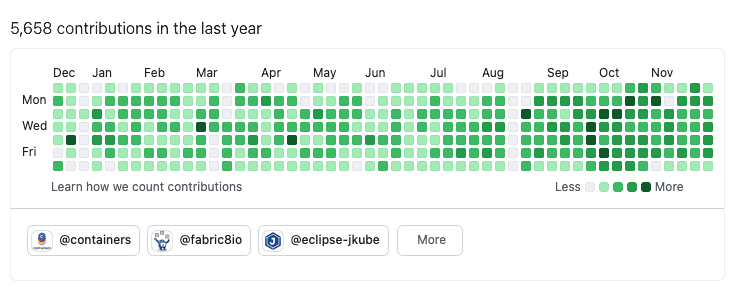
Look at the last three months. After my summer break I restructured my developer workflows and went all-in on AI tooling. The results speak for themselves, I went from 10-15 contributions per day to over 25 contributions per day on average.
I've used AI-assisted development ever since GitHub Copilot arrived. For my personal projects, at least, I've had the luxury of exploring these tools without restrictions.
But this year, I pushed harder. I integrated AI into every possible workflow and measured the outcomes. The productivity gains have been remarkable.
Throughout this post, I'll be using examples from my personal projects like ElectronIM, YAKD, and helm-java to illustrate these concepts. These projects aren't bound by corporate policies, allowing me to experiment freely with tools like GitHub Copilot and others. That said, the practices I describe here apply wherever your organization's policies permit.
How I measured impact
Before anything else: I tried to be concrete about "productivity". My measurements are approximate and meant to show direction rather than provide definitive benchmarks.
- Commit and Pull Request (PR) velocity (commits/day, PRs opened and merged).
- Time-to-merge for small, routine changes.
- Number of automated refactors completed without manual edits.
- Qualitative: how often I could review and merge from my phone or while away from the keyboard (AFK).
Thinking of trying this yourself? Run a small experiment: measure your current output for a month, then adopt AI tooling and quantify your gains.
These numbers reflect my experience as a senior maintainer working on mature projects with strong test coverage. I wouldn't expect the same gains in early-stage or poorly structured codebases, and that distinction matters.
The AI Tooling Landscape
Not all AI developer tools are created equal. After months of experimentation, I've found it useful to categorize them by how they fit into the development workflow:
Autocomplete: The Old Familiar
This is where most developers started their AI journey. Tools like GitHub Copilot's inline suggestions, IntelliJ's AI assistant, or Cursor's tab completion provide real-time code completion as you type.
I've been using autocomplete features for a couple of years now. It's convenient, saves keystrokes, and occasionally suggests something clever. Most importantly, it rarely changes the structure of your work. But here's the uncomfortable truth: on its own, it doesn't improve productivity by much.
Autocomplete is still synchronous work. You're still the one driving, line by line, waiting for suggestions. The cognitive load remains squarely on your shoulders, for bigger tasks, gains are modest.
AI-Enhanced IDEs
Tools like Cursor take things a step further by integrating AI more deeply into the IDE experience. Instead of just completing lines, they can refactor code, answer questions about your codebase, and generate entire functions.
This is a step up from autocomplete, but it still suffers from a fundamental limitation: it remains synchronous. You ask, you wait, you review. No matter how good the model is, the bottleneck is still you.
Chat-Based Interfaces
Chat UIs like ChatGPT, Claude, or Gemini excel at brainstorming, exploring approaches, and researching solutions. They are excellent for getting unstuck or exploring solutions before committing to code.
Their drawback is integration friction. Without tight project context, copy/paste and re-contextualization slow things down.
Command Line Interface (CLI) Agents
Note
I've since built a dashboard to orchestrate and monitor these parallel coding agent sessions across multiple devices and projects. Check it out for a practical look at the orchestrator workflow in action.
This is where things get interesting. CLI-first agents such as Claude Code, Gemini CLI, or Goose change the game by operating within your project context and invoking multi-step tasks from the terminal, often leveraging Model Context Protocol (MCP) for tool integration.
CLI agents can:
- Read and reason about the codebase.
- Make changes across multiple files.
- Run tests and iterate on failures.
- Commit changes with meaningful messages.
The key difference is that CLI agents can work semi-autonomously. You give them a task, they execute, you review. This opens the door to parallelism.
GitHub Issues and Pull Requests
This is probably the most underrated category. AI-powered issue-to-PR workflows, like those enabled by GitHub Copilot Coding Agent or similar tools, let you describe work in prose and receive a ready-to-review pull request.
This workflow resonates deeply with me as a professional open source maintainer. It mirrors the asynchronous collaboration model I've used for years: someone opens an issue, proposes changes in a PR, we iterate through comments, and eventually merge.
The critical difference? It's completely asynchronous. You don't need to be at your computer. I've literally reviewed and approved AI-generated PRs from my phone.
That said, this workflow has rough edges. When the model misses the point, iterations become frustrating. You end up writing correction after correction, wishing you could just edit that one line yourself, but you're locked into the async loop. I see this as the future of async development, but current implementations need refinement.
When it does work, though, it's remarkable. For example, I described a Task Manager feature for ElectronIM with clear acceptance criteria and a UI reference, assigned it to Copilot, and reviewed the resulting work during spare moments. A complete feature, including tests, and everything else was implemented without me writing a single line of code. All it took was a well-written issue and a well-architected project with good test coverage for the AI agent to work effectively. Which brings me to the next point, the project factor.
The Project Factor
Here's something I've observed that doesn't get discussed enough: the state of your project is the single biggest factor in how effective AI tooling will be.
A well-structured project with:
- Comprehensive test coverage.
- Clear, consistent coding patterns.
- Black-box tests that verify behavior through public interfaces, not implementation, so AI can safely refactor internals without breaking the contract.
- Good documentation and clear architecture.
...will yield far better results from AI tools than a messy codebase with no tests and inconsistent patterns.
This makes sense when you think about it. AI tools learn from context. If your context is chaos, expect chaotic results. If your context demonstrates clear patterns, the AI will follow them.
This has been one of my most important realizations. Investing in code quality and solid tests isn't just about maintainability anymore. It's about making your project AI-ready.
The Productivity Multiplier: Asynchronous and Parallel Development
Here's the real secret to the productivity gains I've experienced. It's not about any single tool. It's about parallelism.
In traditional development, you work on tasks sequentially. One after another. Even with autocomplete helping you type faster, you're still limited by your own processing capacity.
With async AI agents, the model flips. I can have multiple Claude Code instances running on different git worktrees, each tackling a separate task. Or better yet, using GitHub's web-based workflows, I can have multiple PRs being worked on simultaneously.
My role shifts from implementer to orchestrator: I provide direction, review output, and course-correct when needed.
And here's the thing: as a developer, I'm not coding all day. Meetings, code reviews, emails, one-on-ones; they all interrupt flow. With async agents, those interruptions become productive gaps. The agents work while I'm on a call.
Tip
To run multiple CLI agents in parallel, you'll need separate working directories. Git worktrees are perfect for this, or you can use multiple machines.
The Uncomfortable Truths
It's not all sunshine and rainbows. Here are some sobering observations:
Burnout Risk
Being able to be productive everywhere and anytime creates the temptation to never disconnect. The cognitive load shifts from implementation to review and orchestration, but it doesn't disappear. Orchestrating many parallel tasks and constantly switching context is mentally draining.
If you're not careful, this newfound productivity can accelerate burnout rather than prevent it. Set boundaries. The work will still be there tomorrow.
The Junior Developer Problem
This is uncomfortable to admit, but AI tooling is effectively replacing junior developers in my workflow. I now have a swarm of AI agents that I can orchestrate like a team of eager interns. They follow instructions, produce code, and iterate based on feedback, without the learning and growth that human juniors need.
The only limitation is my availability to give instructions and review work.
What does this mean for the next generation of developers? How do you become a senior developer if you never get to be a junior first?
Organizations need deliberate apprenticeship and mentoring models so people can progress.
Coding Is No Longer the Job
I love coding. I genuinely enjoy the craft of writing elegant solutions.
But increasingly, that's not what I do. My job has become more managerial: defining tasks, reviewing output, providing feedback, and deciding what to build next.
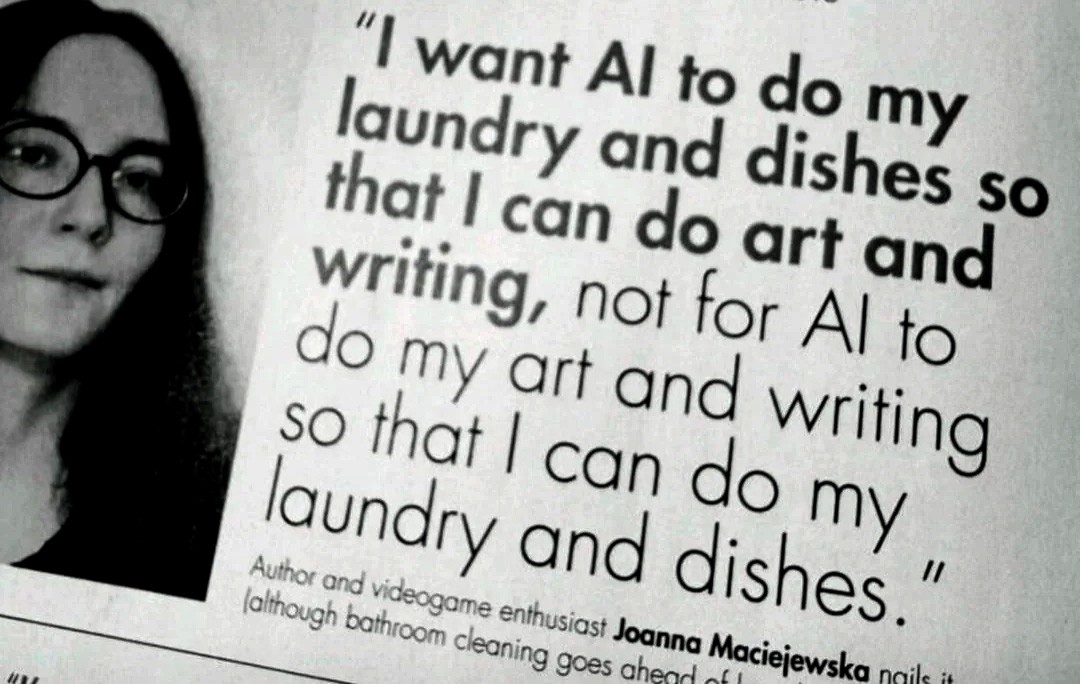
This meme captures it perfectly. The irony isn't lost on me.
Key Takeaways
After months of intensive AI-assisted development, here's what I've learned:
Async Beats Sync
The biggest productivity gains don't come from faster typing or better autocomplete. They come from parallelism. Web-based, async workflows let you orchestrate multiple AI coding agents simultaneously. You don't even need a computer; I've done meaningful work from my phone.
More Hours in the Day
This might sound hyperbolic, but async workflows have figuratively added more hours to my day.
The period I analyzed (September to December 2025) was unusually demanding. During work hours, I was juggling three major open source projects: Kubernetes MCP Server, Fabric8 Kubernetes Client, and Eclipse JKube, plus various AI experiments.
Yet despite this workload, I managed to bring several neglected side projects back to life during my free time. Projects that had been gathering dust for months suddenly became maintainable again.
The reason? Async workflows let me queue up tasks and review results in spare moments. A few minutes here and there, previously too short for meaningful coding, now add up to real progress. Time that was once lost to waiting or context-switching has become productive.
AI Excels at Grunt Work
Repetitive, tedious tasks that would take weeks of focused effort can be completed in days. I refactored this entire blog asynchronously in a couple of days. By my estimates, that would have taken two months of focused work before. Technical debt removal has never been easier.
For example, I migrated YAKD's frontend build from the deprecated create-react-app to Vite.
This involved 193 files, renaming .js to .jsx, migrating Jest to Vitest, and updating ESLint configuration.
What would have taken days of tedious, error-prone work was completed in minutes.
I also tackled ElectronIM's SonarCloud issues using the GitHub Copilot Coding Agent. The project had been clean for years, but as Sonar rules evolved, new issues appeared that weren't flagged before. This is exactly the kind of low-priority work that would otherwise remain undone forever. AI made it possible to tackle.
Patterns Are Everything
AI follows patterns. If you show it a coding style, an architecture pattern, or an implementation approach, it will replicate it. This makes AI incredibly effective for:
- Extending existing functionality following established patterns.
- Applying consistent changes across a codebase.
- Implementing features similar to existing ones.
Project Quality Matters More Than Ever
Well-tested, well-structured projects get better results from AI. Investing in code quality is no longer just about maintainability. It's about AI-readiness.
Conclusion
2025 has been a year of transformation in how I approach software development. The tools have matured, and the workflows have evolved from "AI as autocomplete" to "AI as parallel workforce."
The productivity gains are real, but they come with trade-offs. The nature of the job is changing. The risks of burnout and the implications for junior developers are concerns we need to address as an industry.
But for now, I'm excited about what's possible. The GitHub contributions graph doesn't lie. Something has fundamentally shifted, and I don't think we're going back.


