<?xml version="1.0" encoding="utf-8"?>
<feed xmlns="http://www.w3.org/2005/Atom">
    <id/>
    <title>Agent Client Protocol (ACP) - Marc Nuri - Blogging about business and technology</title>
    <updated>2026-04-23T10:58:15.165Z</updated>
    <generator>www.marcnuri.com</generator>
    <link rel="alternate" href="https://blog.marcnuri.com/tag/acp"/>
    <link rel="self" href="https://blog.marcnuri.com/tag/acp/feed.xml"/>
    <subtitle>Blogging about business and technology</subtitle>
    <entry>
        <title type="html"><![CDATA[Agent Client Protocol (ACP): The LSP for AI Coding Agents Explained]]></title>
        <id>https://blog.marcnuri.com/agent-client-protocol-acp-introduction</id>
        <link href="https://blog.marcnuri.com/agent-client-protocol-acp-introduction"/>
        <link rel="enclosure" href="https://blog.marcnuri.com/static/97fa8ef8f01bab1afbc6157cdc0f1258/818f3/agent-client-protocol-acp-introduction.jpg" type="image/jpg"/>
        <updated>2025-09-10T06:00:00.000Z</updated>
        <summary type="html"><![CDATA[Agent Client Protocol (ACP) is the LSP for AI coding agents: one open standard so any agent runs in any editor. How ACP works and ACP vs MCP.]]></summary>
        <content type="html"><![CDATA[
    <div><a href="https://blog.marcnuri.com/agent-client-protocol-acp-introduction">Original post</a></div>
    <h2 class="heading"><a href="https://blog.marcnuri.com/agent-client-protocol-acp-introduction#introduction" aria-label="introduction permalink" class="anchor"><i class="anchor__link fa-solid fa-link"></i></a><span id="introduction"></span>Introduction</h2>
<p>The <strong><a class="tag-link " title="Agent Client Protocol (ACP)" aria-label="Agent Client Protocol (ACP)" href="/tag/acp">Agent Client Protocol (ACP)</a></strong> is an open JSON-RPC standard for connecting code editors to <a class="tag-link " title="AI Agent" aria-label="AI coding agents" href="/tag/ai-agent">AI coding agents</a>.
The analogy people reach for is <strong>Language Server Protocol (LSP)</strong>, and it is a useful one: ACP aims to break the old 1:1 coupling where each editor needed a bespoke integration for each agent.</p>
<p>Zed introduced ACP in August 2025, and JetBrains joined shortly after.
That quickly turned ACP from a Zed-specific integration mechanism into a broader interoperability layer for agentic coding workflows.</p>
<h2 class="heading"><a href="https://blog.marcnuri.com/agent-client-protocol-acp-introduction#which-agent-client-protocol" aria-label="which-agent-client-protocol permalink" class="anchor"><i class="anchor__link fa-solid fa-link"></i></a><span id="which-agent-client-protocol"></span>Which Agent Client Protocol?</h2>
<p>Over the last two years, three different protocols have used the <strong>ACP</strong> acronym, and search results still mix them together:</p>
<ul>
<li><strong>Agent Client Protocol</strong>: the editor-to-agent protocol this post covers.</li>
<li><strong>Agent Communication Protocol</strong>: an agent-to-agent interoperability protocol associated with IBM Research / BeeAI.</li>
<li><strong>Agentic Commerce Protocol</strong>: a commerce protocol from OpenAI and Stripe for AI-driven checkout flows.</li>
</ul>
<p>In this post, <strong>ACP</strong> always means <strong>Agent Client Protocol</strong>.</p>
<h2 class="heading"><a href="https://blog.marcnuri.com/agent-client-protocol-acp-introduction#what-is-the-agent-client-protocol" aria-label="what-is-the-agent-client-protocol permalink" class="anchor"><i class="anchor__link fa-solid fa-link"></i></a><span id="what-is-the-agent-client-protocol"></span>What is the Agent Client Protocol?</h2>
<p>The Agent Client Protocol is an open JSON-RPC standard that decouples code editors from the AI coding agents they drive.
From the <a href="https://github.com/agentclientprotocol/agent-client-protocol" rel="noopener" title="Link to https://github.com/agentclientprotocol/agent-client-protocol" aria-label="official specification" target="_blank">official specification</a>:</p>
<blockquote>
<p>The Agent Client Protocol (ACP) standardizes communication between <em>code editors</em> (interactive programs for viewing and editing source code) and <em>coding agents</em> (programs that use generative AI to autonomously modify code).</p>
</blockquote>
<p>In plain English: ACP is how your editor drives the agent behind the AI panel.
The editor renders the chat, the diffs, and the permission prompts; the agent runs the inference loop, calls tools, and edits files.
ACP is the protocol they speak across a subprocess boundary.</p>
<h3 class="heading"><a href="https://blog.marcnuri.com/agent-client-protocol-acp-introduction#acp-as-an-lsp-for-ai-agents" aria-label="acp-as-an-lsp-for-ai-agents permalink" class="anchor"><i class="anchor__link fa-solid fa-link"></i></a><span id="acp-as-an-lsp-for-ai-agents"></span>ACP as an LSP for AI Agents</h3>
<p>Zed framed ACP from day one with an explicit LSP analogy:</p>
<blockquote>
<p>Just as the Language Server Protocol unbundled language intelligence from monolithic IDEs, the goal with the Agent Client Protocol is to enable you to switch between multiple agents without switching your editor.</p>
</blockquote>
<p>The same decoupling story plays out.
LSP let a single editor benefit from language servers written by anyone; ACP lets a single editor benefit from agents written by anyone.
One standard, N editors, M agents — instead of N × M bespoke integrations.
This is why ACP is often described as the LSP for AI coding agents.</p>
<h2 class="heading"><a href="https://blog.marcnuri.com/agent-client-protocol-acp-introduction#why-acp-matters" aria-label="why-acp-matters permalink" class="anchor"><i class="anchor__link fa-solid fa-link"></i></a><span id="why-acp-matters"></span>Why ACP matters</h2>
<ul>
<li><strong>Editor–agent portability</strong>: switch between Claude Code, Gemini CLI, Codex, or Goose without switching editors.</li>
<li><strong>Less vendor lock-in</strong>: adopting a new agent no longer forces an editor migration, and vice versa.</li>
<li><strong>Shared UX surface</strong>: chat, diffs, and permission prompts live in the editor instead of being reimplemented per agent.</li>
<li><strong>Open and multi-vendor</strong>: Zed, JetBrains, and Google ship against the spec directly; Anthropic's Claude Code and OpenAI's Codex plug in via adapters.</li>
<li><strong>Natural fit with MCP</strong>: ACP handles the editor-to-agent layer, while MCP handles the agent-to-tool layer.</li>
</ul>
<h2 class="heading"><a href="https://blog.marcnuri.com/agent-client-protocol-acp-introduction#how-acp-works" aria-label="how-acp-works permalink" class="anchor"><i class="anchor__link fa-solid fa-link"></i></a><span id="how-acp-works"></span>How the Agent Client Protocol works</h2>
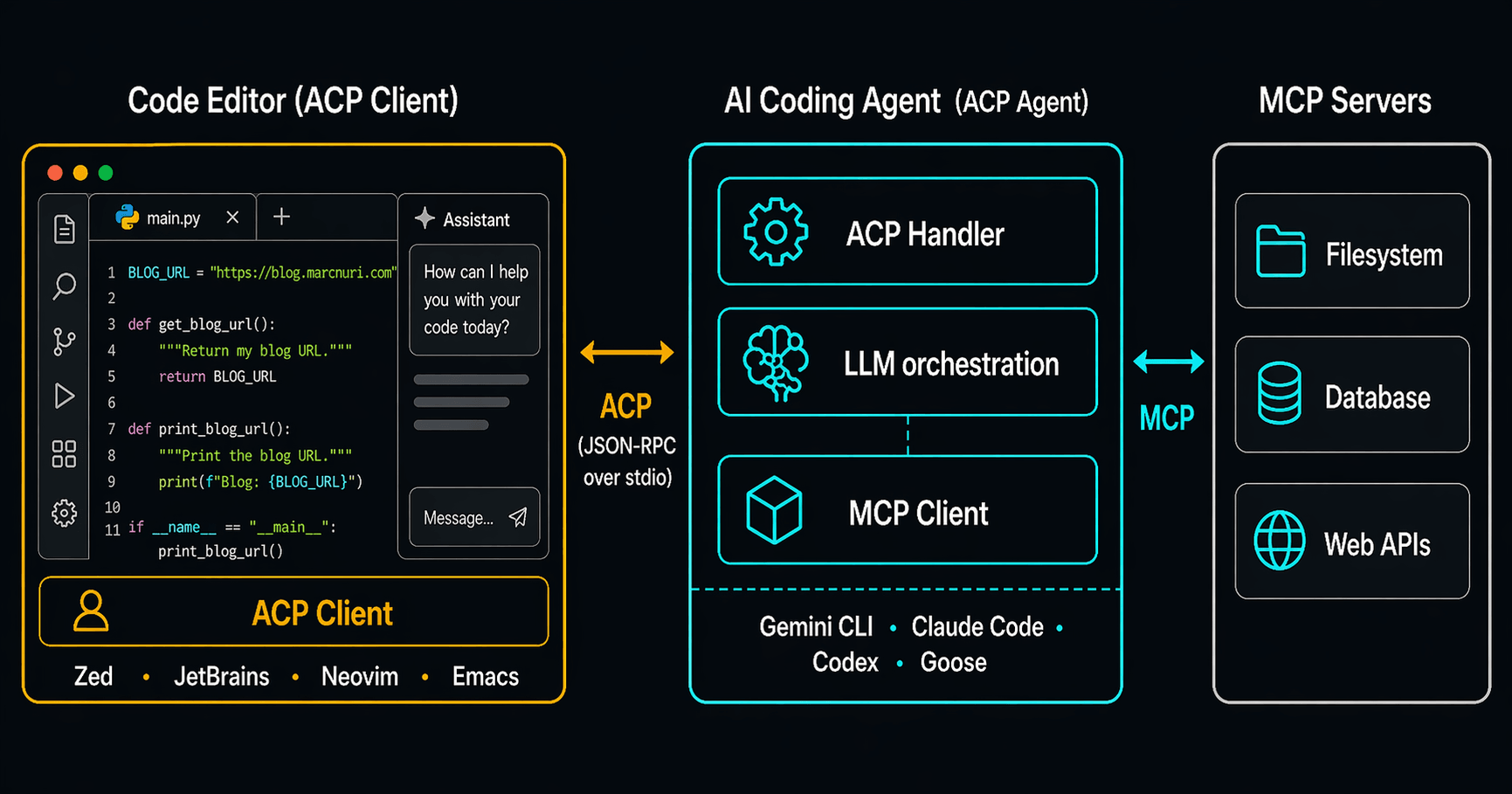
<p>ACP is easiest to understand today as <strong>JSON-RPC 2.0 over stdio</strong> for local subprocess integration.</p>
<p>The editor launches the agent as a subprocess and exchanges protocol messages with it.
That gives the editor a structured way to drive the agent while still keeping the editor in charge of UX, permissions, and workspace mediation.</p>
<p>Remote transports are described in the spec and on the roadmap, but local stdio remains the clearest mental model today.
Sessions are bootstrapped via <code>session/new</code>, which can declare the <code>mcpServers</code> the agent should connect to — so ACP and MCP wire up in a single handshake.</p>
<span class="post-image__pusher "></span><figure class="post-image "><span class="post-image__scrim"></span><a href="/static/88cad145bf3c6949e81e1452846d861f/e54fd/acp-architecture.png" class="post-image__link" title="Agent Client Protocol architecture: code editor as ACP client talking to AI coding agent as ACP agent over JSON-RPC stdio, with the agent connecting to MCP servers"><span class="post-image__image-container"><div data-gatsby-image-wrapper="" class="gatsby-image-wrapper gatsby-image-wrapper-constrained post-image__image "><picture><source type="image/webp" data-srcset="/static/88cad145bf3c6949e81e1452846d861f/29275/acp-architecture.webp 433w,/static/88cad145bf3c6949e81e1452846d861f/eccac/acp-architecture.webp 866w,/static/88cad145bf3c6949e81e1452846d861f/d1836/acp-architecture.webp 1731w" sizes="(min-width: 1731px) 1731px, 100vw"><img data-gatsby-image-ssr="" data-main-image="" style="opacity: 1;" sizes="(min-width: 1731px) 1731px, 100vw" decoding="async" loading="lazy" data-src="/static/88cad145bf3c6949e81e1452846d861f/e54fd/acp-architecture.png" data-srcset="/static/88cad145bf3c6949e81e1452846d861f/869fe/acp-architecture.png 433w,/static/88cad145bf3c6949e81e1452846d861f/6a6cf/acp-architecture.png 866w,/static/88cad145bf3c6949e81e1452846d861f/e54fd/acp-architecture.png 1731w" alt="Agent Client Protocol architecture: code editor as ACP client talking to AI coding agent as ACP agent over JSON-RPC stdio, with the agent connecting to MCP servers" src="https://blog.marcnuri.com/static/88cad145bf3c6949e81e1452846d861f/e54fd/acp-architecture.png" srcset="https://blog.marcnuri.com/static/88cad145bf3c6949e81e1452846d861f/869fe/acp-architecture.png 433w,https://blog.marcnuri.com/static/88cad145bf3c6949e81e1452846d861f/6a6cf/acp-architecture.png 866w,https://blog.marcnuri.com/static/88cad145bf3c6949e81e1452846d861f/e54fd/acp-architecture.png 1731w"></picture><script type="module">const t="undefined"!=typeof HTMLImageElement&&"loading"in HTMLImageElement.prototype;if(t){const t=document.querySelectorAll("img[data-main-image]");for(let e of t){e.dataset.src&&(e.setAttribute("src",e.dataset.src),e.removeAttribute("data-src")),e.dataset.srcset&&(e.setAttribute("srcset",e.dataset.srcset),e.removeAttribute("data-srcset"));const t=e.parentNode.querySelectorAll("source[data-srcset]");for(let e of t)e.setAttribute("srcset",e.dataset.srcset),e.removeAttribute("data-srcset");e.complete&&(e.style.opacity=1,e.parentNode.parentNode.querySelector("[data-placeholder-image]").style.opacity=0)}}</script></div></span></a></figure>
<p>An ACP deployment has three moving parts:</p>
<ul>
<li><strong>ACP client</strong> — the code editor. Owns the UI and initiates the connection. Zed, JetBrains, Neovim, and Emacs are all clients today.</li>
<li><strong>ACP agent</strong> — the AI coding tool. Runs the LLM loop, makes tool calls, and is itself typically an MCP client.</li>
<li><strong>MCP servers</strong> — the tools and data sources the agent calls out to. ACP does not replace them.</li>
</ul>
<p>Work is organized into <strong>sessions</strong> (a conversation with shared context) and <strong>turns</strong> (one prompt-to-response cycle within a session).</p>
<div class="admonition admonition__important"><p class="admonition-title"><i class="admonition-title-icon fa-solid fa-exclamation-circle"></i>Important</p><div class="admonition-content">
<p>The direction is subtly reversed from MCP.
In MCP the AI application is the "host/client" and tools are "servers."
In ACP the <em>editor</em> is the client and the AI agent is the subprocess the editor spawns.
Worth flagging because the terminology repeats but the roles flip.</p>
</div></div>
<h2 class="heading"><a href="https://blog.marcnuri.com/agent-client-protocol-acp-introduction#acp-vs-mcp" aria-label="acp-vs-mcp permalink" class="anchor"><i class="anchor__link fa-solid fa-link"></i></a><span id="acp-vs-mcp"></span>Agent Client Protocol vs MCP: Complementary, not competing</h2>
<p>ACP and <a class="post-link " title="Introduction to the Model Context Protocol (MCP): The Future of AI Integration" href="/model-context-protocol-mcp-introduction">MCP</a> solve different problems at different layers:</p>
<table><thead><tr><th></th><th><strong>MCP</strong></th><th><strong>ACP</strong></th></tr></thead><tbody><tr><td><strong>Between</strong></td><td>Agent ↔ tools</td><td>Editor ↔ agent</td></tr><tr><td><strong>Problem it solves</strong></td><td>How does the agent call tools?</td><td>How does the editor drive the agent?</td></tr><tr><td><strong>Client role</strong></td><td>AI application / host</td><td>Code editor / IDE</td></tr><tr><td><strong>Server or subprocess role</strong></td><td>Tool provider</td><td>AI coding agent</td></tr><tr><td><strong>Transport</strong></td><td>stdio / HTTP-based transports</td><td>stdio today, with remote transport work ongoing</td></tr></tbody></table>
<p>They are complementary, not competing.</p>
<p>A good shorthand is this:</p>
<ul>
<li><strong>MCP</strong> gives the agent tools.</li>
<li><strong>ACP</strong> gives the agent an editor.</li>
</ul>
<h2 class="heading"><a href="https://blog.marcnuri.com/agent-client-protocol-acp-introduction#the-acp-ecosystem" aria-label="the-acp-ecosystem permalink" class="anchor"><i class="anchor__link fa-solid fa-link"></i></a><span id="the-acp-ecosystem"></span>The ACP ecosystem</h2>
<p>The ACP ecosystem has moved fast, but the safest way to describe it is in layers.</p>
<p>On the <strong>client</strong> side:</p>
<ul>
<li><strong>Zed</strong> is the reference editor implementation.</li>
<li><strong>JetBrains IDEs</strong> added ACP support in late 2025.</li>
<li>Community integrations exist for editors such as <strong>Neovim</strong>, <strong>Emacs</strong>, and <strong>VS Code</strong>.</li>
</ul>
<p>On the <strong>agent</strong> side:</p>
<ul>
<li><strong>Gemini CLI</strong> supports ACP natively via the <code>--acp</code> flag.</li>
<li><strong>Claude Code</strong> participates through the <code>claude-agent-acp</code> adapter.</li>
<li><strong>Codex</strong> participates through the <code>codex-acp</code> adapter.</li>
<li>The <strong>ACP Registry</strong> now provides a curated installation surface for a growing set of agents.</li>
</ul>
<p>That mix of <strong>native implementations plus adapters</strong> is exactly what you would expect from an early but rapidly maturing protocol ecosystem.</p>
<h2 class="heading"><a href="https://blog.marcnuri.com/agent-client-protocol-acp-introduction#conclusion" aria-label="conclusion permalink" class="anchor"><i class="anchor__link fa-solid fa-link"></i></a><span id="conclusion"></span>Conclusion</h2>
<p>ACP is doing for agent integrations what LSP did for language tooling: turning bespoke editor integrations into a shared contract.</p>
<p>The pattern is already familiar, one open standard, maintained in the open, with clients and agents shipping independently.
The <a href="https://zed.dev/blog/acp-registry" rel="noopener" title="Link to https://zed.dev/blog/acp-registry" aria-label="ACP Registry" target="_blank">ACP Registry</a> that launched in January 2026 further reduces the friction of discovering and wiring up new agents, and remote transports are on the roadmap to push ACP beyond the local subprocess model.</p>
<p>If you're deciding where to invest as an editor extension author or agent builder, ACP is the surface to build on.
For the layer below — how the agent itself talks to tools — see the companion post on the <a class="post-link " title="Introduction to the Model Context Protocol (MCP): The Future of AI Integration" href="/model-context-protocol-mcp-introduction">Model Context Protocol</a>.</p>
<h2 class="heading"><a href="https://blog.marcnuri.com/agent-client-protocol-acp-introduction#references" aria-label="references permalink" class="anchor"><i class="anchor__link fa-solid fa-link"></i></a><span id="references"></span>References</h2>
<ul>
<li><a href="https://agentclientprotocol.com" rel="noopener" title="Link to https://agentclientprotocol.com" aria-label="Agent Client Protocol — official website" target="_blank">Agent Client Protocol — official website</a></li>
<li><a href="https://github.com/agentclientprotocol/agent-client-protocol" rel="noopener" title="Link to https://github.com/agentclientprotocol/agent-client-protocol" aria-label="agentclientprotocol/agent-client-protocol on GitHub" target="_blank">agentclientprotocol/agent-client-protocol on GitHub</a></li>
<li><a href="https://zed.dev/blog/bring-your-own-agent-to-zed" rel="noopener" title="Link to https://zed.dev/blog/bring-your-own-agent-to-zed" aria-label="Bring Your Own Agent to Zed (Zed, 27 Aug 2025)" target="_blank">Bring Your Own Agent to Zed (Zed, 27 Aug 2025)</a></li>
<li><a href="https://zed.dev/blog/claude-code-via-acp" rel="noopener" title="Link to https://zed.dev/blog/claude-code-via-acp" aria-label="Claude Code via ACP (Zed, 3 Sep 2025)" target="_blank">Claude Code via ACP (Zed, 3 Sep 2025)</a></li>
<li><a href="https://blog.jetbrains.com/ai/2025/10/jetbrains-zed-open-interoperability-for-ai-coding-agents-in-your-ide/" rel="noopener" title="Link to https://blog.jetbrains.com/ai/2025/10/jetbrains-zed-open-interoperability-for-ai-coding-agents-in-your-ide/" aria-label="JetBrains × Zed interoperability (Oct 2025)" target="_blank">JetBrains × Zed interoperability (Oct 2025)</a></li>
<li><a href="https://blog.jetbrains.com/ai/2025/12/bring-your-own-ai-agent-to-jetbrains-ides/" rel="noopener" title="Link to https://blog.jetbrains.com/ai/2025/12/bring-your-own-ai-agent-to-jetbrains-ides/" aria-label="Bring your own AI agent to JetBrains IDEs (Dec 2025)" target="_blank">Bring your own AI agent to JetBrains IDEs (Dec 2025)</a></li>
<li><a href="https://zed.dev/blog/acp-registry" rel="noopener" title="Link to https://zed.dev/blog/acp-registry" aria-label="ACP Registry launch (Zed, Jan 2026)" target="_blank">ACP Registry launch (Zed, Jan 2026)</a></li>
</ul>
<h2 class="heading"><a href="https://blog.marcnuri.com/agent-client-protocol-acp-introduction#you-might-also-like" aria-label="you-might-also-like permalink" class="anchor"><i class="anchor__link fa-solid fa-link"></i></a><span id="you-might-also-like"></span>You Might Also Like</h2>
<ul>
<li><a class="post-link " title="Introduction to the Model Context Protocol (MCP): The Future of AI Integration" href="/model-context-protocol-mcp-introduction">Introduction to the Model Context Protocol (MCP)</a></li>
<li><a class="post-link " title="Giving Superpowers to Small Language Models with Model Context Protocol (MCP)" href="/giving-superpowers-to-small-language-models-with-mcp">Giving Superpowers to Small Language Models with Model Context Protocol (MCP)</a></li>
<li><a class="post-link " title="Introducing Goose, the on-machine AI agent" href="/goose-on-machine-ai-agent-cli-introduction">Introducing Goose, the on-machine AI agent</a></li>
</ul>
  ]]></content>
        <category label="Artificial Intelligence"/>
    </entry>
</feed>