

java.lang.OutOfMemoryError: PermGen space – More memory for Tomcat (Windows)
In many cases, web applications give OutOfMemoryError when their processes require high amounts of memory. Image manipulation, intensive database use, file processing and other common tasks lead to this very common problem.
Normally when you get an OutOfMemory error (not caused by a memory leak) in a desktop application,
you can solve this problem by specifying the Java arguments -Xms*** (initial Java heap size) and -Xmx*** (maximum Java heap size) when running your program.
To solve this issue in Tomcat, you must specify these options in the Tomcat startup command / script.
In windows, Tomcat is usually installed as a service.
Tomcat provides a configuration tool to set up these and other parameters.
You can find it in (Start->Programs->Apache Tomcat->Configure Tomcat) or by running (\bin\tomcat5w.exe //EN//Tomcat5).
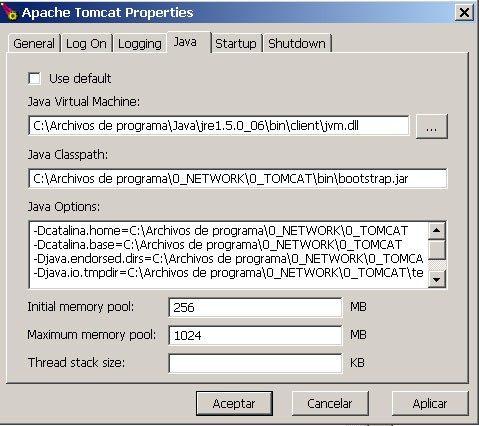
Under the "Java" tab you can find two options:
- Initial memory pool: This corresponds to -Xms, you can specify the size in Mb.
- Maximum memory pool: This corresponds to -Xmx, you can specify the size in Mb.
Now you can specify a higher maximum memory so that Tomcat doesn't get the OutOfMemoryError. Remember to take into account your hardware capabilities.


